Microsoft 365 Copilot adoption has accelerated and the risk surface has expanded with it. Since this post was first published in July 2025, Microsoft has shipped DLP for Copilot prompts (now generally available), a unified DSPM experience with AI agent observability, and a new control plane called Agent 365. Organizations are no longer just deploying a productivity assistant. They are deploying autonomous agents that can take actions across their entire Microsoft 365 environment.
What Has Changed Since July 2025
A lot has happened in the past year. Here are the developments that matter most for organizations securing AI at scale.
Purview DLP Now Covers Copilot Prompts, Web Search, and Browsers
Admins can now define DLP policies that detect sensitive information types directly in user prompts and block Copilot from responding when those prompts contain sensitive data. A separate capability that blocks only external web search, while still allowing Copilot to respond using internal Microsoft 365 data, is currently in public preview; refer to the Microsoft 365 roadmap for the latest timing. Together they give security teams a layered approach that matches the control to the risk.
Purview’s Network Data Security capability now extends DLP protections to network traffic for unmanaged AI applications accessed through Microsoft Entra Internet Access, helping prevent users from sharing sensitive information with consumer AI tools at the browser level. This is general availability for file-based protections and addresses shadow AI risk at a layer separate from tenant-level controls.
DSPM Has Been Unified and Expanded
Microsoft merged classic DSPM and DSPM for AI into a single interface with goal-driven workflows. Administrators select a security objective and see relevant metrics, risk patterns, and remediation recommendations.
Bulk remediation lets security teams fix overshared files in SharePoint at scale rather than one at a time. And agent observability now surfaces an inventory of deployed agents with risk levels and posture metrics, which is critical as organizations spin up autonomous agents in Copilot Studio and Azure AI Foundry.
Updated Reference Architecture Diagrams
Microsoft’s Purview Customer Excellence Engineering team publishes reference architecture diagrams covering classification, labeling, DLP, insider risk, and how Copilot respects sensitivity labels and tenant boundaries. These are a useful resource for any team planning or validating a Purview deployment.
What Makes Microsoft 365 Copilot Powerful and Risky
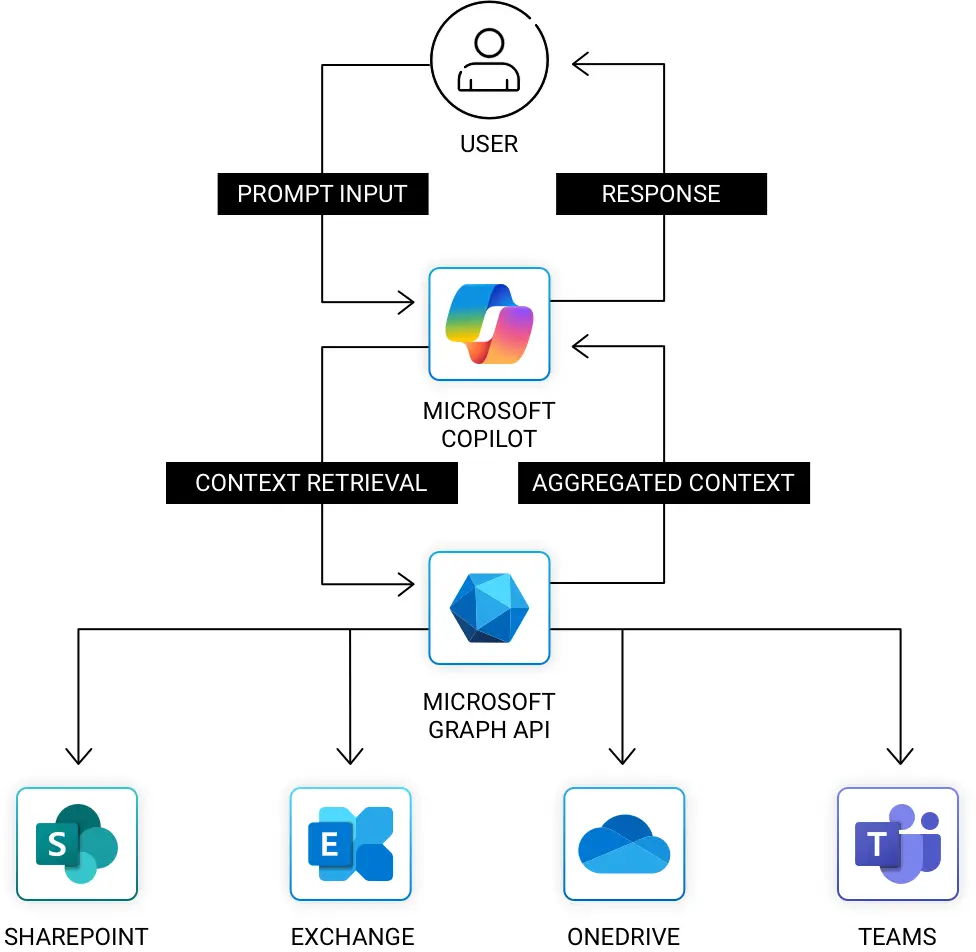
Microsoft 365 Copilot connects to SharePoint, OneDrive, Exchange, and Teams. It uses content a user can access to generate answers, summaries, and recommendations.
That ability depends on Retrieval Augmented Generation (RAG).
RAG works in two steps
Retrieval
Copilot queries Microsoft Graph and the Semantic Index to find relevant content based on the user’s prompt.
Generation
It passes the retrieved documents to the AI model, which generates a response using that context.
This is incredibly useful but also easy to misuse. Since Copilot uses the user’s existing access rights, it can reach anything they can. That includes old files, shared folders with loose permissions, or documents marked as sensitive but not labeled correctly.
The Real Risk Is Unstructured Data and Overexposure
The danger is not that Copilot is too smart. The danger is that your environment is too permissive.
Most organizations have years of unstructured data in SharePoint, OneDrive, and Exchange. Files are mislabeled. Folders are open to “Everyone.” Sensitive documents live in shared team spaces.
Copilot aggregates context across all those systems and hands it to the user in seconds. Security teams must move past static access reviews. The question is no longer “Can this user open this file?” It is “What can Copilot infer from everything this user can reach?”
Agents Expand the Attack Surface
Microsoft Agent 365 became generally available on May 1, 2026, bundled into the new Microsoft 365 E7, the Frontier Suite, and available standalone at $15 per user per month. Microsoft Copilot Studio lets any user with Copilot Studio access create an autonomous agent, connect it to SharePoint, Dataverse, Exchange, Dynamics 365, or any HTTP endpoint, and publish it to Teams or directly into Microsoft 365 Copilot.
The security question is no longer just what Copilot can infer from a user’s data. It is what an autonomous agent can do with that data, at machine speed, without human review. That’s the gap Microsoft Purview and Agent 365 close, and where managed detection extends the protection.
Agentic AI introduces risks that traditional access controls were not designed for. Indirect prompt injection, privilege escalation through connected data sources, and unmonitored agent-to-agent communication are all emerging concerns across the industry. Organizations deploying agents need to treat every agent as a new identity with its own access scope, risk profile, and monitoring requirements.
Microsoft Purview Controls at the Data Layer
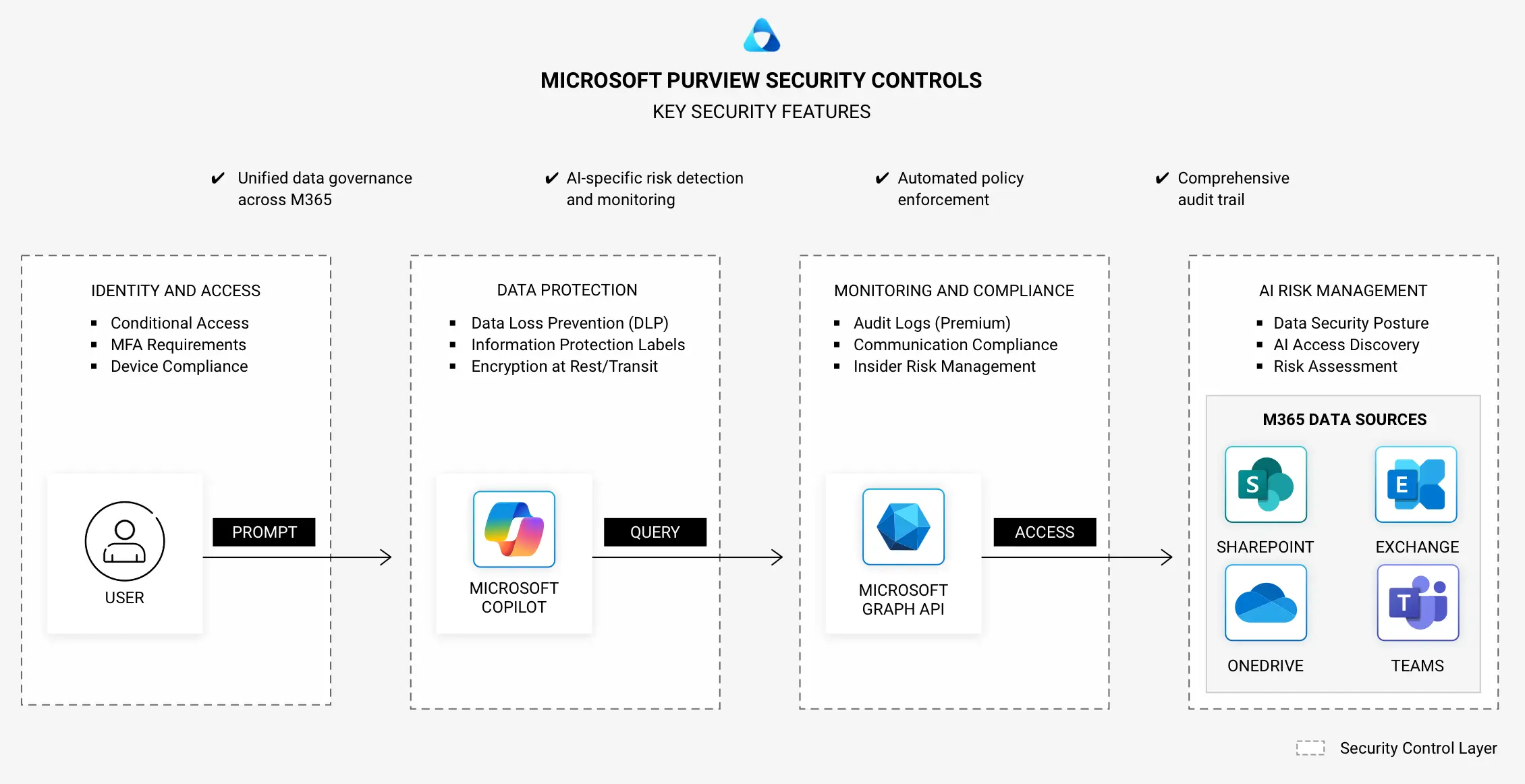
Purview governs data from the inside out, bringing security, compliance, and policy enforcement into the content layer before Copilot or an agent ever retrieves it.
Automated Discovery and Classification
Purview scans Microsoft 365 environments to identify sensitive content using built-in patterns and custom classifiers.
Sensitivity Labels and Enforcement Policies
Labels apply encryption, access restrictions, and usage rules that travel with the data wherever it moves.
DLP for Copilot
Three mechanisms now protect Copilot interactions. Sensitivity label-based file blocking prevents Copilot from using labeled files in responses. SIT-based prompt blocking detects sensitive data in prompts and blocks Copilot from responding. Web search blocking prevents sensitive prompts from reaching external search while still allowing internal responses.
DLP for Copilot Studio Agents
Now in preview, this brings inline DLP controls to custom agents by detecting sensitive information types in prompts before the agent is invoked.
DLP Across Microsoft 365
Purview enforces DLP across Outlook, Teams, SharePoint, OneDrive, and Copilot interactions. Endpoint DLP now supports more than 110 file types.